All Projects
Hollywoodbets  ·  Streaming App  ·  UX Lead

GallopTV

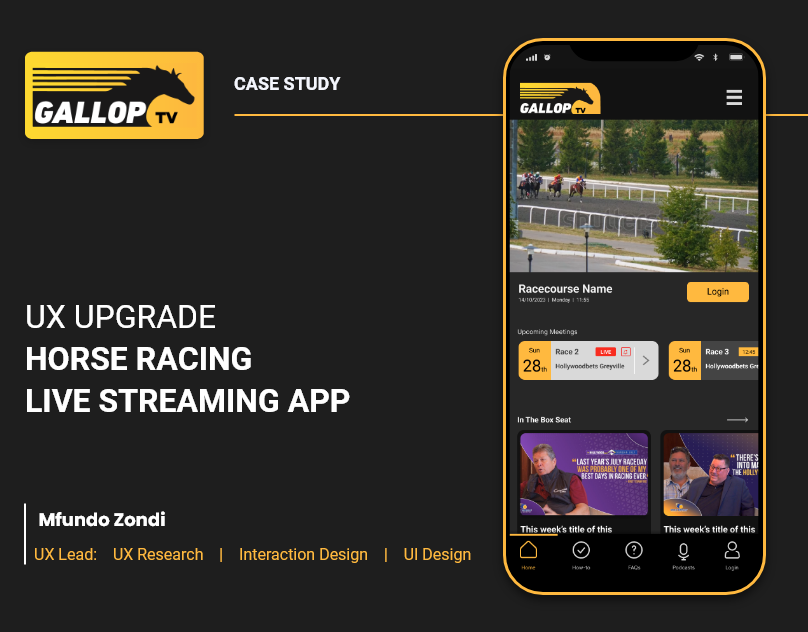
GallopTV was built for TV, then squeezed onto a phone. The content was good, getting to it was the problem. I redesigned the navigation and home screen around what users actually expect on race day.

Lead UX
Mfundo Zondi
Scope
UX Research · UI Design · Interaction Design
Tools
Figma · Adobe XD
Year
2023
Client
Hollywoodbets
View on Behance ↗
GallopTV app screens
Platform
Web App, Mobile-First
Product Type
OTT Streaming App
Primary Goal
2 taps to live race
Scope
Full UX Redesign
100K+
streams · 2025 Durban July
2✕
faster path to live content
100%
mobile-first redesign
4
core flows redesigned
Decision 01
Home Screen Redesign

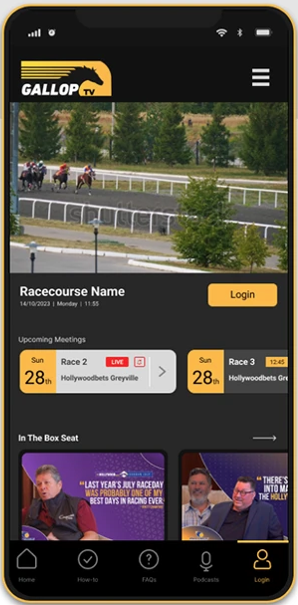
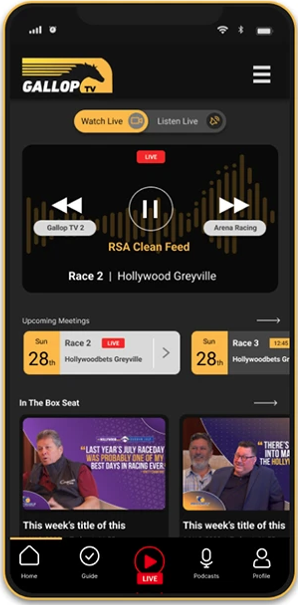
The original GallopTV home looked like a news site. Articles at the top, the stream buried underneath. The thing people came for was not the first thing they saw. I rebuilt the page around what the product actually is.

Live races own the top of the screen now. One card, real-time status, one tap to play. Upcoming races below. On a Saturday morning, you open the app and you are already there.

Before
Generic blog layout; static hero section, no live awareness, didn't have the feel of a streaming product
After
Live race hero pinned at the top, real-time status, one-tap to stream, feels like a streaming platform, not a webiste.
GallopTV, redesigned home screen
2
taps to a live race from the new home screen. Old structure: 3 - 4 clicks.
Decision 02
Navigation Overhaul

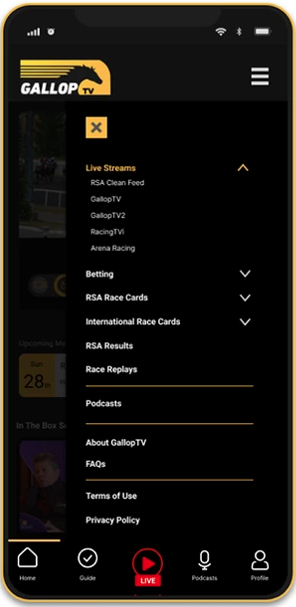
The old nav was a hamburger menu that seemed to hold everything. I replaced it with a bottom bar showing the five things GallopTV users have come to expect and then the secondary functuions in a structured burger menu.

Home. Schedule. Live. Content. Account. Always on screen, labelled. A racing fan on a Saturday morning should never have to think about where to tap.

Before
Hamburger menu, unclear structure, users had to take 4 -5 extra steps to a desired result.
After
5-tab bottom nav, always visible, core actions reachable in one tap from anywhere; easy access.
GallopTV, navigation overhaul
5-Tab Bottom Nav
🏠  Home · 📅  Schedule · 🔴  Live
🎬  Content · 👤  Account
Decision 03
Redesigned FAQs

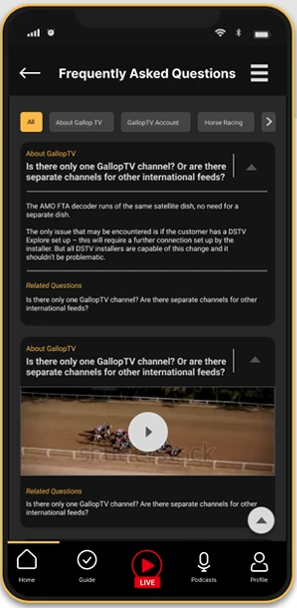
The old FAQs page was a wall of plain text. Questions and answers stacked in a list, no visual structure, no way to scan quickly. I redesigned it as a card-based accordion system.

Each question is a card. Tap to open it. The answer inside is whatever format actually explains the thing best, a paragraph, an image, a video. Not everything needs to be text. next is a suggested related FAQ, so readers who need more context can keep going naturally, limitting dead ends.

GallopTV, redesigned FAQ experience
Decision 04
Switch to Audio

Not every racing fan can watch a screen. I introduced an audio-only mode that lets users switch from video stream to live race commentary, turning GallopTV into a radio experience.

This works for fans at work, on a commute, driving, or anyone who cannot always look at a screen. The display dims, a minimal audio player takes over, and the race keeps going.

Use Cases
Commuting, driving, at work, situations where video isn’t possible but the race must go on
Accessibility
Visually impaired users can follow live races fully through commentary; a previously excluded audience, now included
GallopTV, audio-only mode
🔈  Audio Mode
Screen dims · Commentary continues
Background play · Data efficient
Bonus Feature
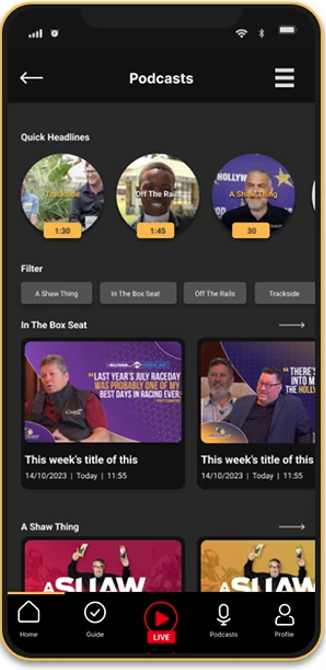
Creator & Podcast Content Hub

Hollywoodbets works with a network of content creators, racing analysts, and podcasters. That content existed so we had to make it accessible.

The Content section brings it all together; podcasts, creator videos. Something worth opening on a Tuesday, not just Saturdays. just something you open when a race is live.

GallopTV, creator & podcast content hub
GallopTV final UI screens
GallopTV, Redesigned UI · Home, Schedule, Live Player · 2023
Home & Discovery
Live race card pinned at the top. Upcoming races scrollable below. Editorial content accessible without leaving home.
Schedule & Alerts
Full race schedule with venue, time, and status. Set reminders per race. Integrated into bottom nav for instant access.
Live Player
Mobile-first fullscreen playback, thumb-reach controls, portrait and landscape optimised, schedule widget in-player.
Explore More Work

Next Case Studies